A customer’s website still hadn’t loaded after about an hour. The customer had read their GoDaddy DNS settings over the phone, and everything sounded correct. The staff member sent the case over with one question: what is going on with this domain?
I think the domain on the account is wrong, and the customer’s DNS looks fine.
What the account said
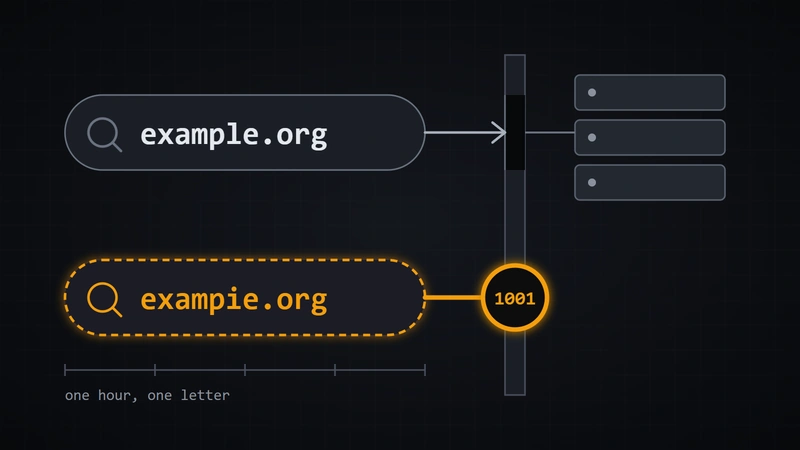
At 2:01 pm that day, the staff member had set the account’s domain to a name ending in .org. That name isn’t registered anywhere. The .org registry has no record of it, and DNS returns “non-existent domain.”
A similar name, also ending in .org, was registered at GoDaddy that same day. It is almost certainly the customer’s new domain. The account’s old domain, a .com, had been removed at 1:47 pm.
What the customer’s side looked like
The similar name that was registered was already set up the way a working customer domain is. Its www address is a CNAME to our platform, and it uses GoDaddy nameservers. Another customer’s domain is set up identically and loads fine.
www on that registered domain returned Cloudflare error 1001. That fits the account having the wrong domain on it, because then our side doesn’t recognize the hostname.
What I did and didn’t do
I didn’t change the domain. The domain is a field on a live customer record that the staff member can edit in the staff UI, so I drafted the reply instead:
Looks like the domain on the account got entered with the wrong name, but the domain he actually registered is a similar name. His GoDaddy settings look right. Can you change the domain on his account to the one he registered? Give it a few minutes after that and it should load. If it still doesn’t, let me know.
I haven’t confirmed the site loads after the change. When the other customer’s domain was added, the scanner logged its own entry about 5 minutes after the staff member’s edit, so it may take a few minutes to start working.
The session took about 18 minutes. The settings the customer read out over the phone sounded correct, and the registered domain was already set up like a working one. The domain on the account was a name the .org registry has no record of.
AI Skills
Use this lesson with the AI assistant you already use
A customer's website hadn't loaded after about an hour, and the DNS settings they read over the phone sounded correct. The cause was a domain on the account that the .org registry has no record of, while the customer's similar name was registered and set up correctly.
Paste the prompt, share only the context needed to answer it, and treat the result as a draft for your review. Do not include confidential information or let an AI assistant make changes without your approval.
The prompt works in any AI assistant as it is. We are also building a /dxdev skill for visual reports and saved memory.
It is not released yet: see what you can use today.
dxdev LESSON · paste into your AI coding agent
LESSON: Verify The Identifier Stored On Your Own Record Exists Before Debugging The Other Side's Configuration
SOURCE: dxdev.com/blog/website-wont-load-address-typed-wrong
WHAT HAPPENED: A staff member asked what was wrong with a customer's domain. The account's domain had been set at 2:01 pm to a .org name that isn't registered anywhere, and DNS returned non-existent domain for it. A similar .org name was registered at GoDaddy that same day and was almost certainly the customer's real domain. That registered name already matched a working setup, with a www CNAME to the platform and GoDaddy nameservers, the same as another customer's domain that loads fine. Its www address returned Cloudflare error 1001, which fits the platform not recognizing the hostname on the account. The domain is an editable field on a live customer record, so nothing was changed and a reply was drafted asking the staff member to correct it. The fix was not yet confirmed, and the platform's scanner may need a few minutes to pick up the change.
THE RULE: When a hosted site won't load and the customer's DNS looks right, first check that the hostname stored on your own record is a name that actually exists in the registry and matches what the customer registered. Only then investigate the customer's settings.
CHECK MY CODE, then report PASS or FAIL with file:line for each:
      1. For any domain stored on an account, a lookup against the registry or DNS confirms the name is registered and resolves, and a failed lookup is flagged before anyone debugs the customer's DNS.
      2. When a customer's registered domain differs from the account's stored domain, the two are compared and any near match is surfaced as a likely typo.
      3. An edge error such as Cloudflare 1001 is treated as a sign the platform doesn't recognize the hostname, which prompts checking the stored domain field first.
THEN PRINT: a table (check, PASS/FAIL, evidence, fix) + a verdict (applies / partially / OUT_OF_SCOPE / no) + the single most important next action.